How to Turn Your Photo Into a 1980s Portrait
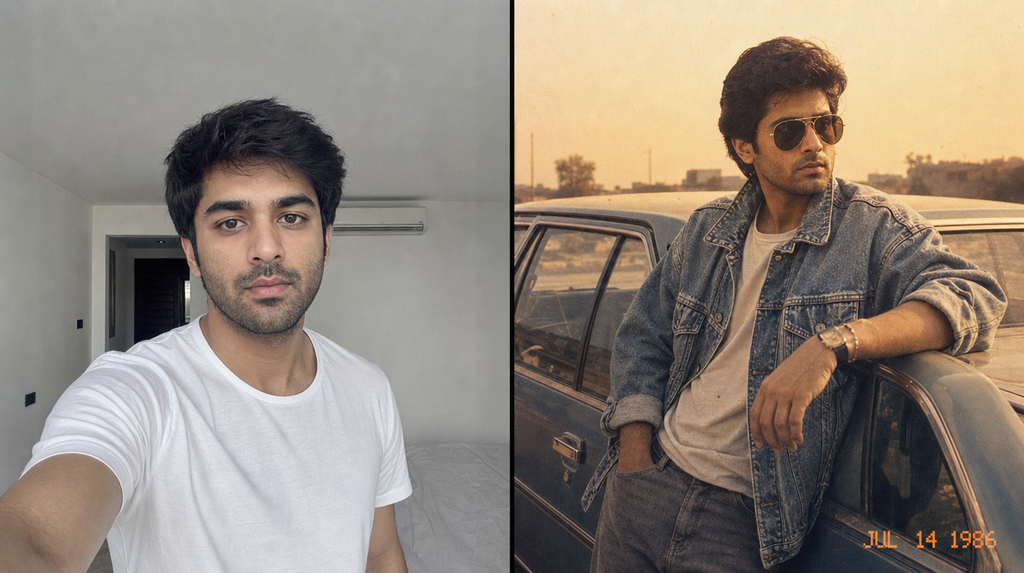
You have seen these on your feed. Somebody’s normal selfie turns into a faded film print from 1986: big hair, acid-wash denim, a boombox on the bonnet of an old car, an orange date stamp burned into the corner. Most of them are made one at a time with long prompts and paid tools.
The photo booth on this page does it in one upload. You pick a look, wait about half a minute, and download the print. No account, no app, no prompt writing.
Here is how to use it and, more usefully, how to get a result that still looks like you.
What you need
One photo. That is the whole list.
It should be a photo where the face is lit and visible. A JPG, PNG or WebP file under 8 MB, which covers basically anything your phone shoots. A photo of yourself works, a photo of you and your partner works, a family photo works.
Step 1: Upload
Tap the frame at the top of the tool and pick your photo, or drag it in from your desktop.
Your photo is resized in your browser before anything is sent, which keeps things fast on mobile data. You will see it appear inside the film frame straight away. If you picked the wrong one, hit Start over and choose again.
Step 2: Pick a look
The looks are grouped into three rows, and each row scrolls sideways.
For him has five. Bombay street, 1985 is the paisley silk shirt and pleated trousers against a black-and-yellow taxi. Acid wash, 1986 is double denim with a boombox. Video store, 1986 is the teal and magenta shell suit. Disco floor, 1983 puts you under a mirror ball. Highway, 1988 is a leather jacket beside an old motorcycle.
For her has three. Studio portrait, 1987 is the big blow-dried hair with jewel-tone puff sleeves and pearl earrings. Hotel lounge, 1989 is black velvet, opera gloves and candlelight. Riviera deck, 1988 is the cream power suit with the gold belt buckle, sea behind you.
Family and couples has two, and these are the ones people underuse. Drawing room, 1988 rebuilds the photo as a family picture taken at home, with a saree, a printed shirt, a wooden-cased television in the corner and the hard shadow of a camera flash on the wall. Parking lot, 1986 puts everyone in matching denim and aviators. Both keep every face in the photo, so upload the group shot as it is.
Step 3: Develop
Press Develop the photo and wait. It usually takes twenty to forty seconds.
While it runs, the film treatment is being applied on your device: grain, warmth, faded blacks, a vignette, and the date stamp. That last part is why the same look never comes out identical twice. The grain is generated fresh each run.
Step 4: Download
Press Download and the print saves to your phone or computer as a JPG, ready to post.
If you want a different look from the same photo, just tap another look and press Develop again. You do not need to re-upload.
Getting a result that looks like you
This is where most people go wrong, so it is worth being specific.
Use a clear, well-lit photo. Front light or soft daylight is ideal. A dark photo gives the model less to work with and the face drifts.
Get close enough. A half-body or waist-up shot works better than a full-body photo taken from across a room. If the face is only forty pixels wide in the original, it cannot come back looking like you.
Skip the heavy filters. If your photo already has a beauty filter, a blur, or a strong colour grade on it, that gets baked in before the retro treatment even starts. Raw camera photos give the best results.
Do not wear sunglasses in the source photo. Several of the looks add period eyewear themselves, and covered eyes in the original make the face harder to hold onto.
For family photos, use a shot where nobody is blurred or half-turned. Every face gets rebuilt, so a face that is already unclear comes back least like itself.
What it will not do
It will not change your face, and that is deliberate.
Every look carries an instruction to keep the same face, the same bone structure, the same skin tone, the same beard, the same body type. No slimming, no skin lightening, no age changes. The wardrobe changes, the hair styling changes, the background changes, the film stock changes. You stay you.
This matters because the fun of these photos is recognition. A stranger in a shell suit is not funny. You in a shell suit is.
How many can I make?
There is a free limit per visitor, which resets on a timer. You will see how many runs you have left under the photo after each one.
The limit exists because each image costs real money to generate. If you hit it, come back later.
Common questions
Does it work on group photos? Yes. Use the two Family and couples looks. They are written to keep every person, their ages and their positions. The other looks are built around one person and can get confused by a crowd.
Can I use it on an old photo of my parents? That is one of the best uses of it. A scanned print from the eighties run through Drawing room, 1988 comes out looking like a photo from the same roll.
Is my photo stored anywhere? Your photo is sent to the image service to be processed and the result comes back to your browser. Nothing is published anywhere on this site.
Why did it come back looking odd? Almost always the source photo. Go back and read the section above on lighting and framing. A different photo of the same person usually fixes it.
Can I use these commercially? Check the terms of whichever image service is powering the tool. For personal posting, you are fine.
Try it
Scroll back up, drop a photo in, and pick a look. Start with Acid wash, 1986 if you cannot decide. It is the one that gets the most replies.
And if you do post one, tag it. The best ones go up on the wall.