What this does
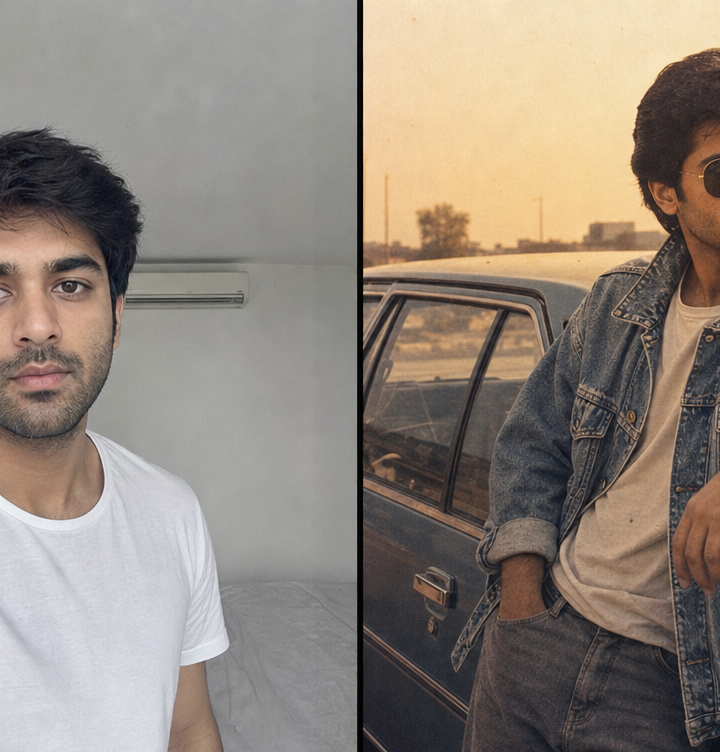
Drop in a normal photo and get it back looking like it came off a roll of film in 1986. Not a filter over the top of your face — the clothes change, the hair changes, the background changes, the film stock changes. You stay you.
Ten looks are ready to go. Five built around a single man, three around a single woman, and two that handle a whole family or a couple in one photo. Every one of them is written to hold onto the face in the photo you upload: same features, same skin tone, same beard, same build. No slimming, no lightening, no age shifting. The whole point is that people recognise you standing in front of that black-and-yellow taxi.
How it works
Upload. Tap the frame above and pick a photo from your phone. JPG, PNG or WebP, up to 8 MB, which covers anything a modern phone shoots. It gets resized in your browser before anything is sent, so it stays quick on mobile data.
Pick a look. The looks sit in three rows that scroll sideways. Tap one and it lights up.
Develop. Press the button and wait twenty to forty seconds. The film treatment — grain, warmth, faded blacks, the orange date stamp — gets applied on your own device at the end, which is why the same look never comes out exactly the same twice.
Download. The print saves as a JPG, ready to post. Want a second version? Tap a different look and press develop again. No need to upload the photo twice.
The ten looks
Bombay street, 1985 — paisley silk shirt, pleated khaki trousers, gold aviators, leaning on the bonnet of a black-and-yellow Ambassador taxi with hand-painted shop hoardings behind. Kodak Portra grain.
Acid wash, 1986 — oversized denim jacket, faded graphic tee, a boombox on the bonnet of a boxy sedan at golden hour. The one that gets the most replies.
Video store, 1986 — glossy teal and magenta shell suit, seated on a step outside a lit video rental shop at night.
Disco floor, 1983 — satin shirt under a mirror ball, magenta and cyan gels raking across the frame.
Highway, 1988 — brown leather jacket beside an old single-cylinder motorcycle on an empty road, dust catching the low sun.
Studio portrait, 1987 — enormous blow-dried volume, jewel-tone puff sleeves, gold and pearl clip-on earrings, soft warm key light.
Hotel lounge, 1989 — black crushed velvet with structured shoulders, long opera gloves, a gold cuff, candlelight and gilded mirrors.
Riviera deck, 1988 — oversized cream linen blazer, wide gold buckle belt, wind in the hair, deep blue sea behind.
Drawing room, 1988 — a family photo rebuilt at home: cream cotton saree with a maroon border, a printed shirt, a wooden-cased television in the corner, and the hard shadow a camera flash throws on a distempered wall.
Parking lot, 1986 — the whole family in matching denim and aviators in front of an old sedan, with the date burned into the corner.
Getting a result that actually looks like you
This is where most people go wrong, and it takes thirty seconds to get right.
Light matters more than anything. Front light or soft daylight. A dark photo gives the model very little to work with, and a face it cannot read clearly is a face it will drift away from.
Get close enough. Waist-up beats a full-body shot taken from across a room. If the face is only a few dozen pixels wide in the original, no amount of processing brings it back.
Skip photos that already have filters on them. A beauty filter, a blur, or a heavy colour grade gets baked in before the retro treatment even starts. Straight-from-the-camera photos give the best results every time.
Take the sunglasses off. Several of the looks add period eyewear themselves, and covered eyes in the source make the face much harder to hold.
For family photos, use a frame where nobody is blurred or turned away. Every face in the photo gets rebuilt, so a face that was already unclear comes back least like itself. And use one of the two family looks — the single-person looks get confused by a crowd.
Questions people ask
Does it work on group photos? Yes, with the two family looks. They carry an explicit instruction to keep every person, their ages, their positions and the number of people in the frame. Nobody gets added, nobody gets removed.
Can I run an old scanned photo of my parents through it? That is one of the nicest things you can do with this. A print from the eighties put through Drawing room, 1988 comes out looking like it was taken on the same afternoon as the original.
How many can I make? There is a free allowance per visitor that resets on a timer. You will see the number you have left under the photo after each run. Each image costs real money to generate, which is why the limit exists.
Is my photo stored? Your photo goes to the image service to be processed and the result comes straight back to your browser. Nothing gets published anywhere on this site.
It came back looking strange. Why? It is almost always the source photo. Go back and read the section above about light and framing. A different photo of the same person usually fixes it on the first try.
Can I use the result commercially? For posting on your own accounts, you are fine. For anything commercial, check the terms of the image service powering the tool.
Give it a go
Scroll back up and drop a photo in. If you cannot decide which look to start with, start with Acid wash, 1986.
And if you post one, tag it. The good ones go up on the wall.